You walk into a restaurant, hungry. You’re handed a soggy paper menu, wait for a server who’s stretched thin, and hope your order is taken correctly.
The place is short-staffed, phones are ringing off the hook, and the line keeps growing.
This familiar scene, long waits, misplaced orders, stressed staff, still happens, but it clashes with how people want to eat today.
Customers now expect mobile-first, fast, and frictionless service.
They want a contactless dining experience when possible, the option to browse digital menus on their phones, and the convenience of faster ordering without having to flag down a server.
Those expectations shape where people choose to spend time and money. That’s where restaurant technology, such as mobile ordering apps and online menus, moves from novelty to necessity.
In this post, we will explore how digital menus and ordering apps are reshaping the customer experience, helping restaurants meet rising expectations, and why embracing these technologies is no longer optional; it’s essential.
What Exactly Are Digital Menus and Mobile Ordering Systems?
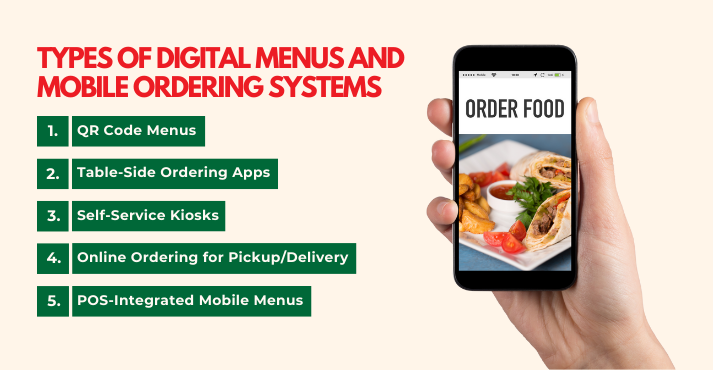
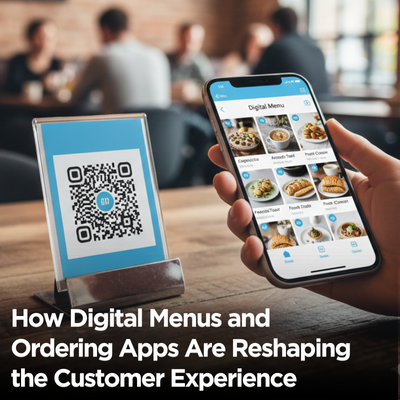
Digital menus and mobile food ordering systems enable customers to view menus, place orders, and sometimes pay via a phone, tablet, or kiosk, rather than relying on paper menus or a server.
They make dining faster, more convenient, and reduce errors. For restaurants, these tools also help manage busy periods, track sales, and improve customer experience.
At their core, these systems combine ordering apps, technology, and integrations to make ordering seamless, whether guests dine in, pick up, or receive delivery.
Here’s a breakdown of the main types you’ll see in restaurants today:
1. QR Code Menus
QR code menus let diners scan a code at their table to view the menu on their phone. No paper. No waiting for a server. Just tap, scroll, and order. Many restaurants link QR menus to payment options, allowing customers to pay directly from their devices.
For example, a small café uses Incentivio to offer QR-coded menus with promotions and loyalty points.
2. Table-Side Ordering Apps
Tableside apps allow diners to order and, in some cases, pay directly from their smartphones while seated at their table. These apps often integrate with the restaurant’s system to update the kitchen in real time.
For example, chains using Toast or Square enable customers to browse the menu, customize their orders, and send them straight to the kitchen.
3. Self-Service Kiosks
Self-service kiosks are touchscreen stations within the restaurant where customers can browse the menu and place orders. Kiosks are ideal for fast-casual spots with high volume, reducing lines and freeing staff to focus on other tasks.
For example, McDonald’s and many fast-casual brands use kiosks integrated with POS systems to streamline ordering and payment.
4. Online Ordering for Pickup/Delivery
Many restaurants now offer online ordering for takeout or delivery, often through third-party platforms like Uber Eats or DoorDash.
These systems allow customers to order from anywhere, view estimated delivery times, and sometimes track their orders in real time.
5. POS-Integrated Mobile Menus
The most advanced digital menus are fully integrated with the restaurant’s POS, payment systems, and analytics. Thus, choosing the right POS system means orders go directly to the kitchen, payments are seamless, and managers can track sales, popular items, and customer behavior in real time.
For example, a local restaurant using Square POS with its mobile menu can see which dishes sell fastest, monitor revenue, and automatically adjust inventory.
Digital menus and ordering apps aren’t just convenient; they give restaurants tools to improve efficiency, speed, and the overall dining experience while offering customers control and flexibility.
Why Restaurants Are Switching: It’s About Experience, Not Technology
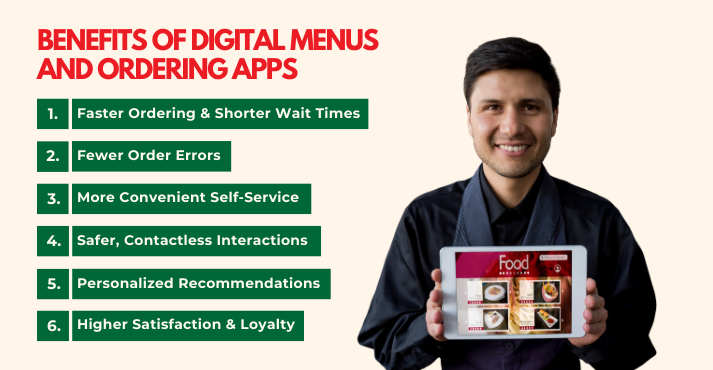
Today’s restaurants aren’t adopting digital tools just because they can.
They’re doing it because these systems create better outcomes for both guests and operators, from a frictionless guest journey to real gains in speed, accuracy, and customer satisfaction.
Here are the real benefits in terms of problems solved, solutions delivered, and how diners feel as a result:
Faster Ordering & Shorter Wait Times
Busy rushes, long lines, and slow service have always strained dining rooms. Traditional ordering can bottleneck, especially when staff are stretched thin.
Digital menus and faster ordering speed this up: guests browse and submit their choices instantly, reducing back‑and‑forth with waitstaff and shortening wait times.
Result: Guests get served faster, spend more time enjoying their meal, and feel like the experience moved at their pace.
Fewer Order Errors
Handwritten tickets and verbal orders are prone to mix‑ups, especially during peak hours. Errors cost time, waste food, and frustrate guests.
Digital interfaces send orders directly to the kitchen, and customers confirm their selections before submission, significantly improving order accuracy.
Some data show that digital interfaces can reduce errors and increase accuracy by 20–30%.
Result: Diners receive exactly what they expected, reducing complaints and boosting confidence in the restaurant’s service.
More Convenient Self‑Service
Customers don’t always want to wait for attention; they want control. Whether scanning a QR code, tapping through a table‑side menu, or placing an order from home, self‑service shifts the power to the diner.
This convenience helps restaurants manage peak traffic and lets staff focus on meaningful service rather than repetitive tasks.
Many consumers now prefer digital options, with a large share of diners choosing digital over traditional methods.
Result: Guests feel empowered and appreciated, with a smoother, more intuitive dining experience.
Safer, Contactless Interactions
Even as pandemic concerns ease, many diners still value reduced physical contact.
Contactless ordering solutions and payment solutions enable people to interact with menus and complete transactions on their own devices.
Result: Guests feel safe and comfortable, reinforcing trust in the brand’s care for their experience.
Personalized Recommendations
A static paper menu can’t tailor itself to your tastes, but digital menus can.
By analyzing order history and preferences, systems can suggest dishes or add‑ons that truly match a guest’s behavior. Personalization isn’t just clever tech; it increases average tickets and encourages guests to explore new items.
Result: Diners enjoy relevant suggestions, feel understood, and are more likely to return.
Higher Satisfaction & Loyalty
All these improvements, speed, accuracy, convenience, safety, and personalization, add up to a stronger overall experience.
Today’s diners reward seamless interactions: digital engagements influence where people choose to eat, how often they return, and whether they join a brand’s loyalty program.
With digital lift often linked to higher repeat business and deeper guest connection, restaurants in the midst of restaurant digital transformation are seeing measurable gains in guest retention and loyalty metrics.
Result: Happy customers come back more often and recommend the experience to others, a vital edge in a highly competitive market.
A Step-by-Step Look at the New Guest Journey
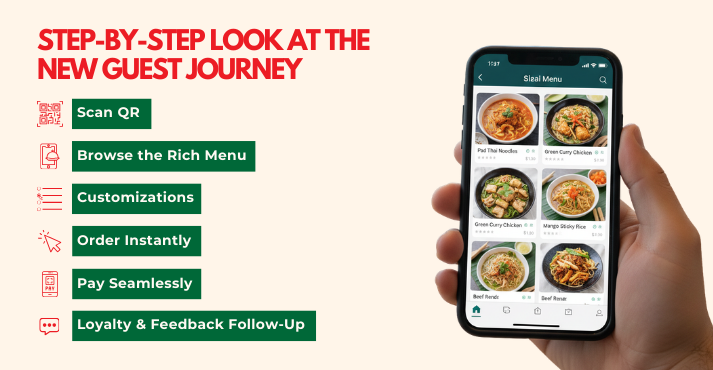
You arrive hungry, are shown to your table, and instead of waiting for a server to hand over a menu, you spot a small QR code.
You pull out your phone, tap the link, and everything unfolds quickly: a beautiful, easy-to-scan menu, options to tweak your dish, and the chance to pay when you’re ready.
No waving, no waiting, no guesswork.
Here’s what this journey looks like from arrival to payment:
1. Scan QR
You sit down, scan a QR code on the table, and the menu appears on your screen instantly. No paper menus, no roaming servers, just immediate access. Because the menu loads on your device, you start in control the moment you’re seated.
2. Browse the Rich Menu
Images, short descriptions, icons indicating whether a dish is spicy or gluten-free, and clear prices make choices obvious. Visual menus increase confidence: you can see the portion size, plating, and suggested pairings before you choose. Filters (vegetarian, low-calorie) help you find what you want without asking.
3. Customizations
Want the burger medium-rare, extra pickles, or no onions? Customization options appear as simple toggles or dropdowns. Allergies and special notes are captured at the point of order, so your requests travel directly to the kitchen.
4. Order Instantly
Tap “Send Order,” and your choices go straight to the kitchen. The order bypasses handwritten tickets and frantic note-taking, reducing the risk of errors. As a result, staff can focus on cooking and guest care rather than taking notes.
5. Pay Seamlessly
When you’re ready, hit “Pay.” Stored cards, one-tap contactless payments, split-bill options, and suggested tip levels make checkout painless. Because payment happens on your device, there’s no waiting for a bill or chasing a server.
6. Loyalty & Feedback Follow-Up
After the meal, the system can send a receipt, add loyalty points, and invite short feedback or a quick rating. Smart follow-ups may also offer a discount on your next visit as a gentle nudge to return.
Digital Menus vs Traditional Menus: What’s the Real Difference?
The shift from paper to digital menus is more than just a tech upgrade; it’s a fundamental change in how restaurants operate and interact with customers.
While a paper menu is static, a digital menu is a dynamic, interactive tool that boosts sales and improves service.
Here’s a comparison table highlighting the key operational differences that affect both the customer experience and the restaurant’s efficiency.
| Feature | Paper Menu | Digital Menu |
| Updates | Manual, slow, and costly to reprint. | Instant and free, with real-time changes. |
| Upselling | Limited to text and physical placement. | Automated with visual highlights, photos, and prompts. |
| Data | Provides no customer or performance insights. | Delivers analytics on item popularity and customer engagement. |
| Speed | Relies on server pace, often slower. | Enables faster, direct customer ordering. |
| Personalization | One standard menu for all guests. | High, with tailored recommendations and filtered views. |
Why Instant Updates Transform Operations
The ability to change your menu instantly is a game-changer for operations and profitability.
With a paper menu, a price increase or a sold-out dish leads to customer frustration and wasted printed materials. A digital menu solves this in real time.
This agility allows restaurants to easily introduce limited-time offers, happy-hour specials, or seasonal items, keeping the menu fresh and encouraging repeat visits.
Importantly, it moves the menu from being a simple cost center to an active tool for increasing revenue, improving efficiency, and enhancing the entire frictionless guest journey.
Must-Have Features Customers Actually Care About
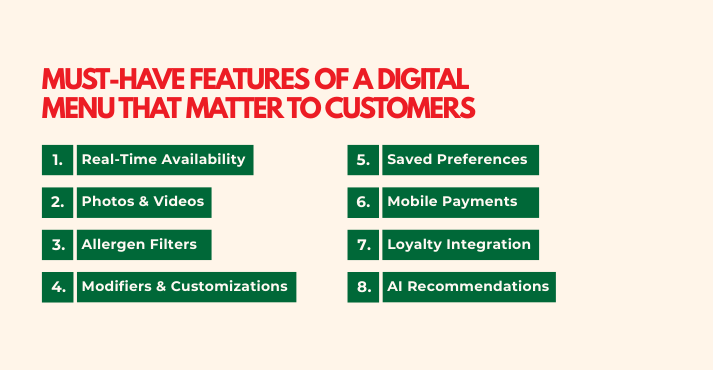
In an age of feature overload, the best restaurant technology focuses on solving core customer frustrations. The most valuable features are those that directly enhance speed, clarity, trust, and convenience.
The must-have features that matter most to customers:
1. Real-Time Availability
Seeing instantly whether an item is sold out prevents disappointment from settling for a second choice. This clarity eliminates guesswork for the customer and awkward conversations for the staff, streamlining the entire process.
2. Photos & Videos
A compelling image or short video is far more effective than text alone. Visuals provide immediate clarity on portion size, presentation, and ingredients, building appetite appeal and trust in what will be delivered, which can significantly reduce order anxiety.
3. Allergen Filters
Allowing customers to filter the entire menu by allergens (e.g., gluten, nuts, dairy) is a non-negotiable safety and trust feature. It transforms a stressful browsing experience into a confident and safe one, showing the restaurant prioritizes customer well-being.
4. Modifiers & Customizations
A digital system should match the flexibility of telling a server exactly how you want your dish. Easy “hold this” or “extra that” options empower personalization, giving customers clarity and control to get their meal just right.
5. Saved Preferences
Remembering a customer’s favorite order, default address, or common modifiers turns a generic transaction into a personalized service. This convenience makes reordering effortless and makes the customer feel recognized.
6. Mobile Payments
The ability to pay seamlessly via a saved wallet or digital payment method (such as Apple Pay) at the end of a meal is the ultimate convenience. It eliminates the wait for the check and the card shuffle, creating a truly fast and frictionless exit.
7. Loyalty Integration
Automatic points earning and visible reward tracking should be baked into the ordering flow. This builds trust in the program and provides a clear incentive for loyalty, encouraging the next visit without needing a physical card.
8. AI Recommendations
Based on past orders or popular pairings, suggesting a relevant side, drink, or dessert adds a layer of smart convenience. It can enhance the meal and subtly increase order value while making the experience feel uniquely tailored.
To prioritize effectively, focus first on features that build trust and clarity (like allergen filters and real-time availability), as these address fundamental customer needs.
Then, layer in features that enhance convenience and loyalty to encourage repeat visits.
It’s Not Just Better for Guests — It’s Better for Business
customer experience in restaurants.
Digital menus and ordering apps are more than just new gadgets; they are strategic levers to boost your bottom line and streamline your operations.
For operators, the investment translates into measurable improvements in revenue, efficiency, and long-term customer value.
Here’s a table that summarizes the key business impacts, linking the core strategies to specific outcomes:
| Business Strategy | Key Outcome | Operator’s Benefit |
| Automated Upselling & Smart Menu Design | Higher Average Order Value (AOV) | Drives revenue without increasing guest count or menu prices. |
| Streamlined Ordering & Payment | Reduced Staffing Pressure & Faster Turnover | Optimizes labor costs and increases coverage per service. |
| Digital Order Transmission & Analytics | Fewer Mistakes & Lower Waste | Reduces remake costs and spoilage, directly improving margins. |
| Integrated Data Capture | Actionable Customer Insights | Powers personalized marketing and informed operational decisions. |
| Seamless Loyalty Integration | Improved Retention Marketing | Increases guest lifetime value through higher return rates. |
Driving a Higher Average Order Value
The power to strategically guide customer choices is one of the most direct ways to increase restaurant revenue. Digital systems excel at this through consistent, automated upselling.
- Intelligent Prompts: Modern POS and kiosk systems can be programmed with “smart prompts” that suggest high-margin add-ons or popular pairings at the perfect moment in the order flow.
- Dynamic Menu Engineering: Digital menus allow you to visually highlight combo meals, chef’s specials, and high-profit items using placement and imagery.
- Measurable Impact: Studies of restaurants that implement kiosk and mobile ordering show sales gains, with a significant portion of revenue growth tied directly to these digital platforms.
Enhancing Operational Efficiency and Turnover
Digital tools alleviate two major pressures: labor costs and slow table turnover. They streamline workflows, allowing your team to focus on hospitality rather than transactions.
- Reduced Order Errors: When orders are placed directly by the customer via a kiosk or their phone and sent instantly to the kitchen display system, miscommunication is eliminated.
- Faster Payment, Faster Turnover: The traditional payment process, dropping the check, collecting the card, running it, and returning it, can take 15 minutes or more.
- Labor Optimization: By automating order-taking and payment processing, staff can be redeployed to more valuable tasks, such as guest engagement, food running, and maintenance.
Leveraging Data for Smarter Decisions
Moving from intuition to insight is a cornerstone of restaurant digital transformation. Every digital interaction generates valuable data.
- Inventory & Waste Management: Integrated restaurant analytics track what sells and what doesn’t in real time. This enables precise inventory ordering and quick digital promotions on slow-moving ingredients before they spoil, dramatically reducing food waste.
- Menu Performance Insights: You can see exactly which items are your most profitable (not just your most popular) and which add-ons are frequently paired together.
- Understanding Guest Preferences: Digital ordering builds a first-party customer database. You can learn individual order histories and preferences, which is not possible with anonymous third-party delivery orders.
Building Customer Retention and Loyalty
The ultimate goal is to turn one-time guests into regulars. Digital systems make it easier to build and leverage a loyalty program that actually works.
- Frictionless Enrollment & Rewards: Guests can join your loyalty program with a tap at checkout via your app or payment system.
- Personalized Marketing: With customer data from your digital channels, you can send tailored offers (e.g., “Your favorite pasta dish is back!”) instead of generic blasts.
- Enhanced Guest Experience: The combined effect of faster service, accurate orders, easy payment, and personalized recognition creates a superior customer experience in restaurants.
Common Questions Restaurant Owners Ask
Adopting restaurant technology trends naturally brings up important questions.
Here are practical answers to the most common concerns about digital menus and ordering systems:
Are QR Menus Annoying Or Helpful?
They are helpful when implemented thoughtfully, but can be annoying if used as a cost-cutting shortcut. The best approach is choice, offer QR menus while keeping physical menus available on request.
Do Customers Actually Prefer Mobile Ordering?
Preference is strong and growing, especially for specific occasions. A significant majority of diners now prefer to order and pay digitally when dining in at quick-service or casual restaurants, valuing the speed and control, and offering it as a complementary option meets both needs.
Will This Replace Staff?
No, it redefines their roles. Digital ordering enables staff to be redeployed to higher-value roles that enhance the guest experience: greeting guests, offering personalized recommendations, managing the floor, and ensuring food quality.
Is It Expensive To Implement?
Costs vary widely, making it accessible for most budgets. More advanced integrated platforms with kiosks or full POS integration require a higher initial investment.
The key is to view it as a revenue-generating tool, not just an expense. The return comes from higher order values, labor efficiency, and reduced waste, often justifying the cost.
What About Older Customers?
While adoption is lower, many older customers appreciate the clarity and ease when guided. Design for inclusivity by ensuring large text, simple navigation, and obvious help options.
The most important rule is never to assume; always train staff to proactively offer assistance, and keep physical menus readily available to ensure every guest feels comfortable.
Does It Increase Tips?
Digital systems that include a tip prompt during payment standardize the ask and often lead to consistent tipping. Thus, by freeing staff from transactional duties, they can focus on providing excellent hospitality, the key driver of generous tips.
Popular Digital Menu & Ordering Platforms to Consider
Choosing the right platform is a critical decision that impacts your operations, customer experience, and bottom line.
Here’s a comparison of leading platforms to help you find the best fit for your restaurant’s specific needs.
| Platform | Best For | Strengths | Limitations |
| Toast | Full-service & counter-service restaurants seeking a comprehensive, all-in-one system. | Restaurant-specific design with intuitive features for courses, splits, and modifiers. Deep integration between online ordering, POS, and kitchen systems. Strong reporting and inventory tools for data-driven decisions. | Often requires proprietary Toast hardware, which can mean higher upfront costs and vendor lock-in. More systems than a very small, simple operation needs. |
| Square for Restaurants | Small to mid-sized cafes, restaurants, and food trucks prioritize flexibility and low upfront cost. | Simple setup with a free plan available to start. “Pay as you grow” model with transparent pricing. Excellent mobility; works on iPads and owns devices for tableside service. | Some advanced restaurant features such ase detailed inventory) require an upgrade to a paid plan. The interface can feel too simple for complex menus and lacks built-in menu item images. |
| Incentivio | Restaurants focused on building direct guest relationships, loyalty, and data-driven marketing. | Commission-free online ordering keeps more revenue. Advanced guest engagement tools for personalized marketing and sophisticated loyalty programs. Consolidates data for actionable insights into customer behavior. | Core strength is guest-facing digital experience; may require integration with a separate, full-scale POS for complex back-of-house operations. |
| Uber Eats/DoorDash (Off-Premise) | Extending reach and capturing delivery/demand customers without building the tech in-house. | Massive, built-in customer base and brand recognition. Handles delivery logistics (fleets, driver management). Powerful discovery tools for new customers. | High commission fees significantly cut into margins. You “rent” the customer relationship—limited data access and brand control. Menu management can be fragmented across multiple apps. |
| Others (Lightspeed, TouchBistro) | Specialized needs: Lightspeed excels for venues with complex inventory (e.g., gastropubs). TouchBistro is favored by traditional dine-in spots for its reliable iPad-based system and offline mode. | Lightspeed: Powerful inventory and retail management. TouchBistro: User-friendly for front-of-house, strong offline operation. | Lightspeed: Higher monthly cost and steeper learning curve. TouchBistro: Fewer third-party integrations; add-ons increase cost. |
How to Choose the Right Platform
Your restaurant’s primary goals should guide the decision. Think through these key questions:
Is your goal operational efficiency or guest loyalty?
If streamlining the flow from order to kitchen is the priority, a robust POS like Toast is key. If building a loyal customer base is important, a platform like Incentivio, which focuses on marketing and retention, may be ideal.
What is your growth model?
For a lean start or a flexible, mobile operation, Square’s scalable model is advantageous. For rapid multi-location growth, consider cloud-based systems designed for centralized management.
Will you use third-party delivery?
It’s wise to use platforms like Uber Eats for reach, but prioritize integrating them with your own commission-free online ordering system to convert those customers into your own, higher-margin regulars.
Should you consider a hybrid approach?
Many successful restaurants use a combination: a core POS (such as Toast or Square) for in-house operations, integrated with a specialized guest engagement platform (such as Incentivio) for digital marketing and loyalty.
How to Successfully Implement Digital Ordering in Your Restaurant
Launching digital ordering successfully requires more than just buying software. It’s a strategic project that blends technology, training, and marketing.
Follow this step-by-step guide to ensure a smooth rollout that delights both your staff and guests.
- Assess Needs: Identify your top goal, like speeding up service or increasing sales, to pick the right tools.
- Choose System: Select a platform that integrates directly with your current POS to ensure seamless operations.
- Design Menu: Optimize it for mobile use with clear photos, text, and navigation.
- Train Staff: Position the technology as a tool to enhance their service, not replace their roles.
- Test UX: Have real people try the ordering flow before launch to find and fix issues.
- Promote: Actively introduce the feature to customers using table signs and staff recommendations.
- Track & Optimize: Use the platform’s analytics to review performance and make data-driven improvements.
What’s Next: AI, Personalization, and Smarter Dining
Digital menus aren’t the finish line; they’re the platform. Once orders, payments, and guest interactions move through a digital layer, restaurants can add smarter layers on top.
Here are the key trends and technologies restaurants must look out for:
- AI Recommendations: Systems will suggest dishes, sides, and upsells based on a guest’s preferences, time of day, and similar guests’ orders.
- Predictive Ordering: Machine learning can predict busy windows and likely items, enabling kitchens to stock smarter, schedule staff more tightly, and reduce waste.
- Dynamic Pricing: Pricing that shifts based on time, demand, or inventory (e.g., lower-price combos during slow hours; premium pricing during peak periods) is being piloted by major chains.
- Voice Ordering: Conversational agents and voice bots are moving from trials into real service (drive-thrus, phone ordering, and hands-free in-store flows). These can expedite ordering and serve guests who prefer speaking to tapping.
- Deeper Customer Data: Digital orders feed profiles: preferences, frequency, spend, and response to offers. That data powers targeted loyalty campaigns, better menu testing, and long-term retention strategies.
The Bottom Line: Convenience Wins
The shift to digital menus and ordering fundamentally creates a faster and easier experience for guests, who gain control over the pace of their meal, from browsing to payment, while enjoying greater accuracy.
When processes are easier to navigate, customers feel more confident and are more likely to follow through on decisions rather than abandon them halfway.
From a business perspective, convenience directly supports profitability. Smooth, efficient, and tailored experiences increase conversion rates, encourage repeat engagement, and lower operational friction.
Over time, this creates loyal customers who are willing to return and recommend the brand to others.
That said, embracing this technology is not about replacing tradition but enhancing it, ensuring restaurants meet modern expectations and build a stronger, more resilient business for the future.
Frequently Asked Questions
How do digital menus improve customer experience?
Digital menus improve customer experience by making ordering faster, clearer, and more convenient. Customers can easily browse items, view images, check ingredients or allergens, customize orders, and see real-time availability without waiting for staff. Mobile-friendly digital menus also reduce errors, support contactless ordering, and allow guests to order at their own pace, creating a smoother, more confident, and more enjoyable dining experience.
Do ordering apps increase revenue?
Yes, ordering apps can increase revenue when implemented thoughtfully. They encourage higher spend through upselling prompts, add-ons, and personalized recommendations, while faster ordering and checkout help turn tables more efficiently. Apps also reduce order errors, capture valuable customer data, and support repeat visits through loyalty features, together creating a smoother experience that often translates into higher average order value and more consistent sales.
Are QR menus better than printed menus?
QR codes are generally more flexible than printed menus, especially for restaurants that frequently update prices, items, or specials. They reduce printing costs, allow real-time changes, support photos and dietary details, and integrate easily with mobile ordering. However, they work best when offered as an option, not a replacement, since some customers still prefer a physical menu.
What features should a restaurant ordering app have?
A restaurant ordering app should make ordering fast, easy, and reliable for both guests and staff.
- Simple, intuitive menu navigation
- Fast, secure checkout
- Customization and modifiers
- Real-time order tracking
- POS integration
- Loyalty and rewards
- Promotions and push notifications
- Multiple payment options
- Customer profiles and order history